This is the update site for the development version of WireframeSketcher plug-in. It’s the next unreleased version and it is intended for testing purposes and hotfixes.
What’s new
Warning
Please note that this is a development version and may contain bugs. If you want to stay on the safe side, just put a separate copy of WireframeSketcher in a different directory and use that to install and test the development version.
Installing
To help testing choose your environment and follow the instructions:
Eclipse IDE
Go to installation instructions and follow the instructions there for your specific IDE. Make sure to replace any reference to the regular update site with http://wireframesketcher.com/staging.
WireframeSketcher
1. From WireframeSketcher open the update manager by selecting Help > Install New Software….
2. Click Add… and enter the following location:
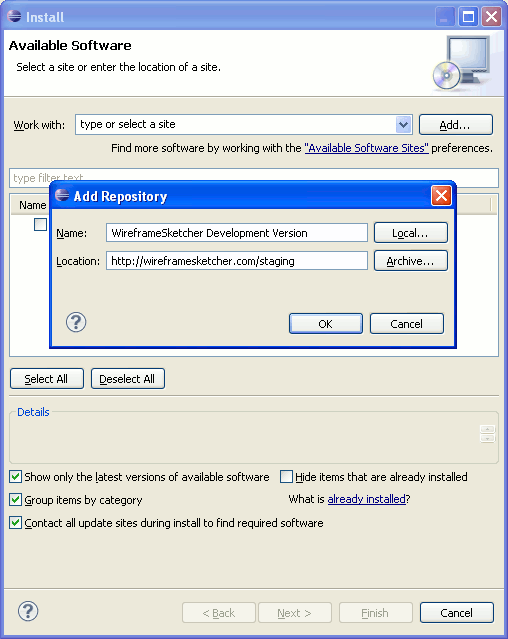
3. Select WireframeSketcher plug-in and finish the installation.
4. If you are unable to finish the installation then you are it’s probably because WireframeSketcher is installed system-wide and there is a permission issue. This can be solved by running WireframeSketcher as administrator.