Hi there! I am happy to announce a new release of WireframeSketcher. This new version brings a new set of improvements meant to improve your productivity. Please read on.
Nudge actions
Nudge actions let you move widgets using only your keyboard. This is very useful when you need more precision. I’ve made a few changes so that widgets can now also be resized using keyboard shortcuts. To make this all work consistently existing shortcuts had to be modified slightly:
- Arrows – Nudge selection by 2px
- Shift+Arrows – Nudge selection by 20px
- Ctrl+Arrows – Nudge resize selection by 2px
- Ctrl+Shift+Arrows – Nudge resize selection by 20px
The logic is simple. Use Ctrl (or Command on Mac OS X) for nudge resize. Use Shift to nudge in increments of 20px.
There is also Alt key that you can use to reduce the increments to 1px and 10px respectively. However there is a slight problem with Alt+Ctrl combinations on Linux so lets say that it’s not an official shortcut for now.
Duplicate action
Duplicate action is something you can find in most graphical editors and WireframeSketcher now also has it. The shortcut for duplicate is Ctrl+D.
Duplicate works mostly like Copy&Paste. So instead of using Ctrl+C, Ctrl+V you can now simply press Ctrl+D.
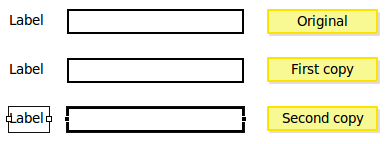
However duplicate is a bit smarter than just a simple Copy and Paste. When you duplicate some widgets, move them and then duplicate them again, the duplicate action records the relative position of your first copy to the original and then positions the second copy relative to the first copy in the same way.
If it sounds complicated then try to quickly create a form like this. Create a label and a text. Select both and press Ctrl+D to duplicate them. Align this first copy vertically with the original. Press Ctrl+D and watch how the second copy is magically positioned exactly the way you want. Continue pressing Ctrl+D to create as many rows as you need:
Better Button widget
The Button widget saw some improvements in this version. First, buttons now have font properties. Additionally buttons can now be vertically resized.
Another change concerns button colors. Buttons are now smarter and will switch their foreground to white if the background is too dark:

Note in the above screenshot that icons are also rendered using the foreground color. This is something that now also works in other widgets like Label and Text.
Palette rearrangement
A took the risk to rearrange all palette entries. Now all widgets are sorted alphabetically. I think this should make locating a widget a much more easier task. Please let me know how you like this change.
Other changes
- Added Background/Alpha properties for Table and List widgets as requested by Jonathan
- Fixed resize feedback while zoomed
- Fixed the bug when changing size for multiple icons at once
- Better position scaling for non-resizable widgets when resizing groups
- Added a small set of mobile icons
- Fixed a slight problem with Alpha slider
- Improved the look of Browser widget
- Better search support for auto-completion with Ctrl-Space
Updating
As usual to update to the latest version of WireframeSketcher just use the Eclipse update manager.
Enjoy!
Hi there! I am happy to announce a new release of WireframeSketcher. Yet again it’s a bunch of small and not so small improvements that should make your time spent with WireframeSketcher more productive.
Improved resize
I’ve changed the way the resize of multiple widgets works. Now it’s much more natural. When resizing multiple widgets their positions and sizes are scaled proportionally.
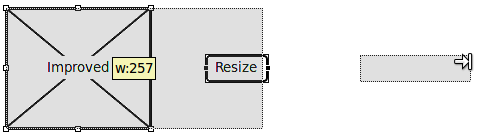
The best part is that you can now also resize grouped widgets. The resize will work exactly the same way there. I think this makes widget grouping a whole lot more useful.
Bigger icons
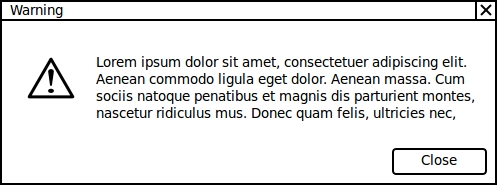
Icons now also come in 48×48 size. I think this will help you find more uses for the icon set:
Disabled text style
A new wiki style now lets you render a piece of text as disabled. This functionality was requested by Jonathan here. The most obvious place for it is in Menus and Popups but I am sure you’ll find other uses:
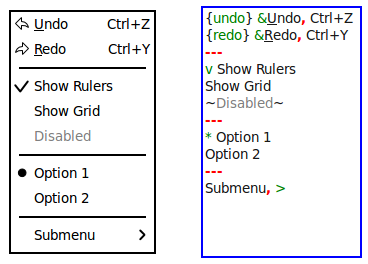
To make a piece of text disabled just surround it with tilde(~) characters like this: ~Disabled Text~.
Actual widget size in XML
As of this version, two new attributes “measuredWidth” and “measuredHeight” are stored in the XML. Unlike “width” and “height” these attributes always contain the actual size of the widget, even if the widget is sized automatically.
Most definitely those of you that look into exploiting the XML format used by WireframeSketcher will find this additional information useful.
Other changes
- Multiple selection works when drag is started over a locked widget. You can now lock a widget in background and it will get out of your way when you work on the rest of your wireframe.
- Button widget now supports &char syntax to indicate mnemonics. This is in line with what Menu and Popup widgets do.
- Wiki syntax now accepts markup characters inside styled text. For example this works as expected: *bold*text*.
- Pasting the same content multiple times increases the offset after each paste.
- Image and Master widgets now display clearly when the source file is missing.
- A more comprehensible tooltip is shown during resize.
- New “loading” icon.
- Popup widget now always calculates its height automatically.
- Fixed the problem with auto-scroll when reordering widgets.
- Fixed the positioning of resize tooltip.
Updating
As usual to update to the latest version of WireframeSketcher just use the Eclipse update manager.
Enjoy!