Hi there! With this blog post I’d like to make a little experiment. I’d like try to involve you more directly into the decisions behind the development of WireframeSketcher. If this works well then we’ll repeat this more in the future.
For this first time I’ve chosen a small issue that is nonetheless important. Currently the light gray color is used to show the selection in widgets like List, Table and Tree. The problem with this color is that the contrast is too low and on some monitors is hard to distinguish it against the white background. I’d like to try a different color. The objective for the color to have a better contrast but still blend well with the overall wireframy style. My feeling is that a pastel color could do a good job.
To avoid theoretical discussions I’ve spent some time testing different colors and made a list with those that I found interesting. Head to the selection color discussion topic to vote for your color of choice or propose a different one.
Selection color discussion topic
Thank you in advance!
Hi there! It’s time for a new release and what a release! I’ve decided to change my priorities and to make this version to be entirely about exporting. Being able to easily share your work is very important and you made it clear to me here. So here it comes!
Exporting to PDF
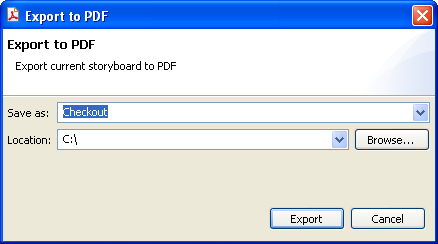
You can now export to PDF the same way you did it for images. What’s different is that you can also export your storyboards into a multi-page PDF document. If you weren’t using storyboards before then here’s one more reason to add them to your toolbox.
Batch Export
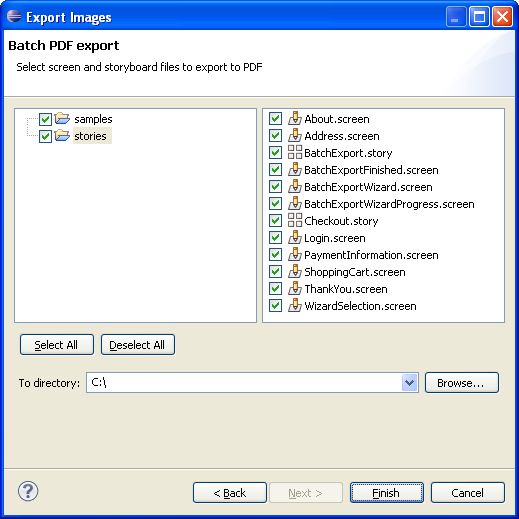
Until today the only option you had for batch export was the command line. From now on you can use batch export wizards to export all your wireframes and storyboards at once. You will find these wizards in the standard Eclipse export dialog which you can open with File > Export….
Download the pdf-export-example.pdf file to learn how the batch export works and see what the result looks like. You can also download the sources for this example batch-export-wireframes.zip. Who knows, you might actually learn a few tricks!
Command Line
Of course you can also perform PDF exports from the command line. See the user guide for more details on new command line options.
Other Changes
I’ve also spent some time for this version on UI polishing. The most significant change concerns context menus. I’ve reorganized them so that less frequent actions are placed at the bottom. I think the menus look better now and have a better usability.
Credits
This release would not be possible without the amazing iText free PDF library by Bruno Lowagie! If you ever need to generate PDFs from you Java apps then consider buying the iText in Action book. It was actually quite helpful to me and it’s a good way to recompensate Bruno for his efforts!
Feedback!
So what you think about this new version? If you have any suggestion on how things can be improved then I’d like to hear it!
Updating
As usual to update to the latest version of WireframeSketcher just use the Eclipse update manager.
Enjoy!
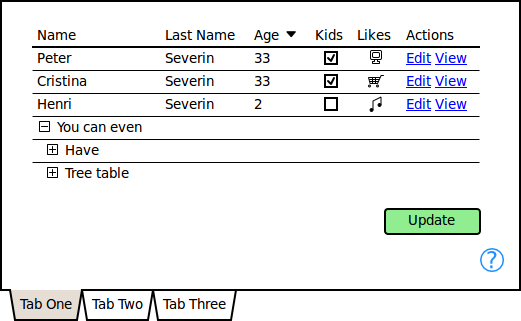
Hi there! I am back to my biweekly update schedule. Here’s a wireframe that summarizes the most important changes in the latest version:
What’s New
- New Tabbed Pane widget. I am not sure why I’ve waited for so long to add this, but here it is. Tabbed Pane has properties for setting the position of tabs, the background color and the visibility of vertical scrollbar.
- Toggle the visibility of grid lines for Table widget.
- Foreground color for Icon widget.
- Background color for Button widget.
- Background color for Group widget.
- Vertical scrollbar for Group widget.
- Escape markup characters using \. Example: \*escape bold markup\*.
- Renamed the “Save As Image” dialog and actions to “Export as Image” and also changed the shortcut from Ctrl+I to Ctrl+Shift+I.
- Added Ctrl+B, Ctrl+I and Ctrl+U shortcuts for toggling bold, italic and underline styles. Ctrl+B was actually there before but I’ve added Ctrl+I and Ctrl+U to respect the conventions.
Mac OS X
I’ve had a good test session with Mac OS X. This time I’ve tried to ensure that all shortcuts are working properly. I’ve updated the Keyboard Shortcuts section in the User Guide with Mac OS X specifics.
Aptana Studio 2.0
Aptana Studio 2.0 was released a few days ago. WireframeSketcher works without issues under this version. I’ve updated the installation instructions for Aptana.
Updating
As usual to update to the latest version of WireframeSketcher just use the Eclipse update manager.
Enjoy!